Incarnate
Set component to optional
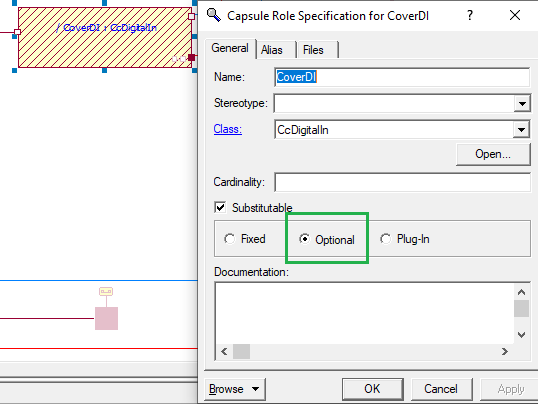
Component won't incarnate automatically. If you want to use it you need to call incarnate.
Create attributes for incarnate
Open < Name >Caps -> State Diagram
Now create RegisterX and Attribute inside < Name >Caps -> Cc< Name > according to the pictures
create RegisterX
SUPER::RegisterX();

//################################################ Hardware Params ###########################################
//|### Parameter: HP_HasCover
//| HP_HasCover if is using cover, CxBool
//>
m_xbHasCover        .Register( *m_poXAggregation, "HP_HasCover",        CrXVar::GUIR_OWNR_INIHO, 0, true);
//<

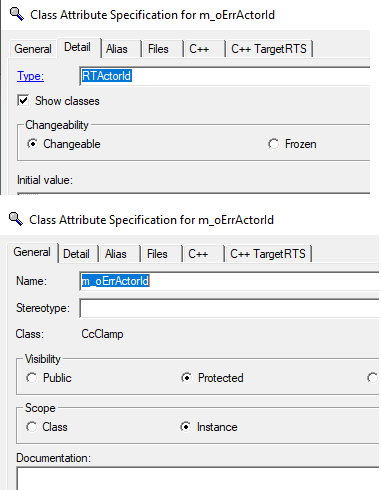
Set Attribute m_xbHasCover in hardware.ini if you want incarnate.
Add incarnate
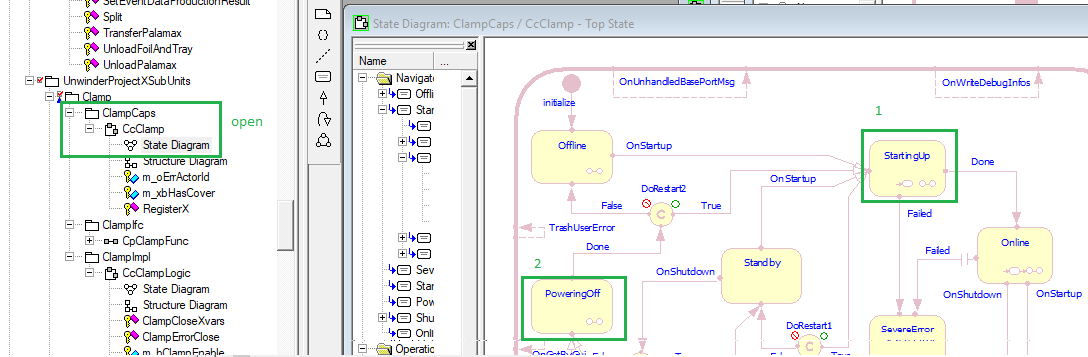
Open in: < Name >Caps -> State Diagram
After StartingUp -> StartupAddtionalComponents -> and open choose point accorting to the picture
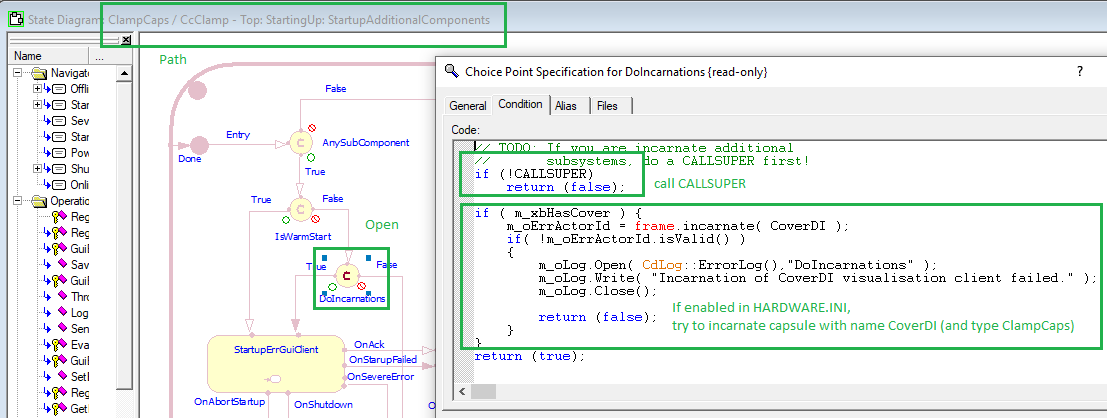
if you write here you must call "CALLSUPER"
call CALLSUPER
if (!CALLSUPER)
    return (false);
Edit your component and attribute name: m_xbHasCover and CoverDI
if ( m_xbHasCover ) {
    m_oErrActorId = frame.incarnate( CoverDI );
    if( !m_oErrActorId.isValid() )
    {
        m_oLog.Open( CdLog::ErrorLog(),"DoIncarnations" );
        m_oLog.Write( "Incarnation of CoverDI visualisation client failed." );
        m_oLog.Close();

        return (false);
    }
}
If you have multiple incarnates:
-
create define example:
#define UNWINDER_PLOTER_CUTTER_COUNT_INCARNATE 2 -
change type object m_oErrActorId to:
RTActorId[UNWINDER_PLOTER_CUTTER_COUNT_INCARNATE] -
and use for incarnate this code:
Edit your component and attribute name: m_xbHasDMCStaticScaner, m_xbHasBrushBeltDrive and DMCStaticReader, BrushBeltDrive
int counter = 0;
/*------------------ option 1 (different component types) -------------------------*/
if ( m_xbHasDMCStaticScaner ) {
    m_oErrActorId[counter] = frame.incarnate( DMCStaticReader );
    if( !m_oErrActorId[counter++].isValid() )
    {
        m_oLog.Open( CdLog::ErrorLog(),"DoIncarnations" );
        m_oLog.Write( "Incarnation of DMCStaticReader visualisation client failed." );
        m_oLog.Close();

        return (false);
    }
}

if ( m_xbHasBrushBeltDrive ) {
    m_oErrActorId[counter] = frame.incarnate( BrushBeltDrive );
    if( !m_oErrActorId[counter++].isValid() )
    {
        m_oLog.Open( CdLog::ErrorLog(),"DoIncarnations" );
        m_oLog.Write( "Incarnation of BrushBeltDrive visualisation client failed." );
        m_oLog.Close();

        return (false);
    }
}
/*------------------ option 2 (same component type) -------------------------*/
if ( m_xbHasDMCStaticScaner ) {
    for( int i = 0; i < DMC_SCANNER_COUNT; i++){
        m_oErrActorId[counter] = frame.incarnate( DMCStaticReader );
        if( !m_oErrActorId[counter++].isValid() )
        {
                        m_oLog.Open( CdLog::ErrorLog(),"DoIncarnations" );
                        m_oLog.Write( "Incarnation of DMCStaticReader visualisation client failed." );
                        m_oLog.Close();

                        return (false);
        }
    }
}
...
var counter continues with value of all incarneted components + 1
Destroy object
Now you must destroy object at finish
Open in: < Name >Caps -> State Diagram
After open path: StartingUp -> PoweringOff -> trigger DoDestructions
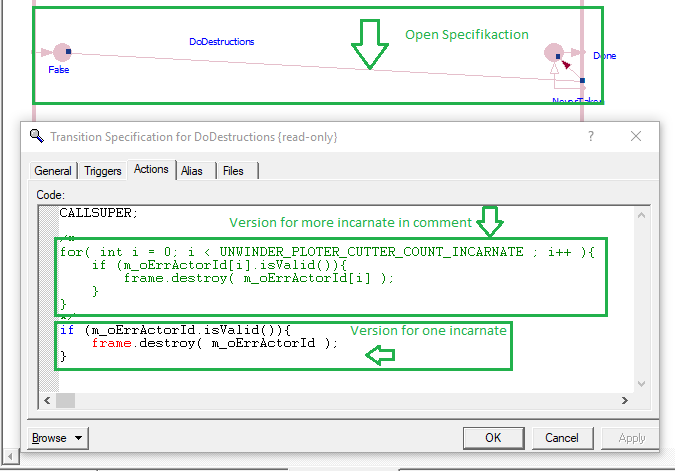
Edit your define: UNWINDER_PLOTER_CUTTER_COUNT_INCARNAT
CALLSUPER;
/*----------- option 1 (more safe) ----------------*/
for( int i = 0; i < UNWINDER_PLOTER_CUTTER_COUNT_INCARNATE ; i++ ){
    if (m_oErrActorId[i].isValid()){
        frame.destroy( m_oErrActorId[i] );
    }
}

/*----------- option 2 (dynamically checks cardinality of component) ----------------*/
for( int i = 0; i < Heating.size(); i++ ){
    if (m_oHeatingControllerActorId[i].isValid()){
        frame.destroy( m_oHeatingControllerActorId[i] );
    }
}
If you have only one incarnation you can use this code:
Tip
CALLSUPER;

if (m_oErrActorId.isValid()){
    frame.destroy( m_oErrActorId );
}
Use inside < Name >Logic
Create a choice point and write:
Edit your component: CoverDI
return CoverDI.isBoundAt(0);
Note
By calling < component >.size() you can get cardinality of the component
By calling < component >.isBoundAt(< number >) you can get number of incarnated components (objects)
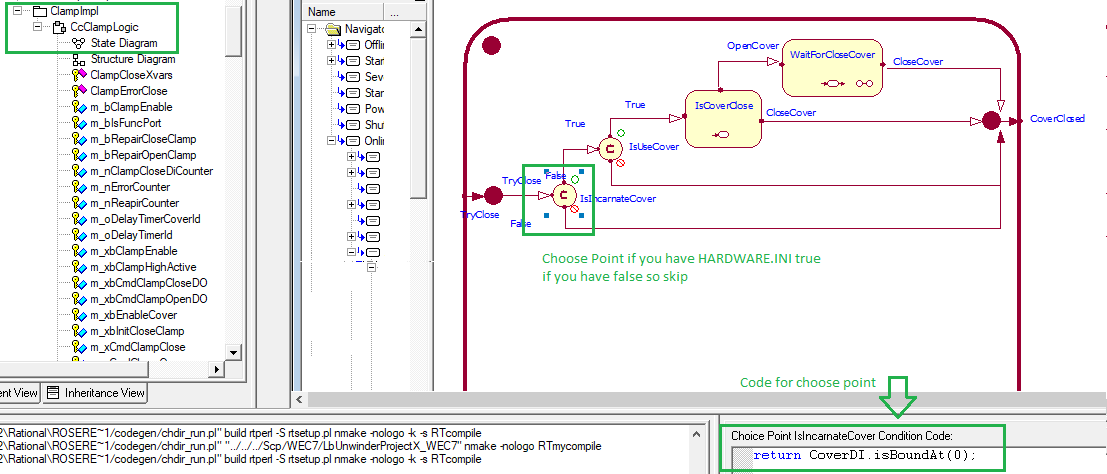
If is HARDWARE.INI attribute true so execute your code
If is HARDWARE.INI attribute false so skip your code
Remove EmptySlot0 from path
If you have issue with incarnated path of subunits adding EmptySlot0, additional code must be added to initialize transition of said subunit.
Note
Incarnated path:
MachineName_EmptySlot0_SubunitName
Instead of expected:
MachineName_SubunitName
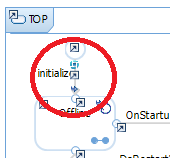
Edit your transition: initialize
CALLSUPER;

m_sIncarnationName.Empty();

// needs the value m_sIncarnationName from the m_oInitData
if ( rtdata )
{
    m_sIncarnationName = *((CdString*)rtdata);      // (received incarnation parameter)
    CrAssertExLog(!m_sIncarnationName.IsEmpty());
    m_bIncarnationNameIsSetManually = true;
}

// find out RoleName of Capsule
m_sSubstCapsuleRoleName = GetLongNameOfCapsule();

// set log caption

m_oLog.SetContainerName( m_sSubstCapsuleRoleName );

// set pointer to global data

m_oPubAttr4Innards.AddAttr( this, m_oLog, "Log" );
m_oPubAttr4Innards.AddAttr( this, (CrTV)m_sSubstCapsuleRoleName, "SubstCapsuleRoleName" );
m_oPubAttr4Innards.AddAttr( this, (CrTV)m_sDescription, "Description" );